
Guide
Task History
This page is the provision queue and the recent job log. It is written for the operator watching a create, an upgrade, or a failed retry.
Menu: Addons → Proxmox Suite → Operations → Task History
Purpose
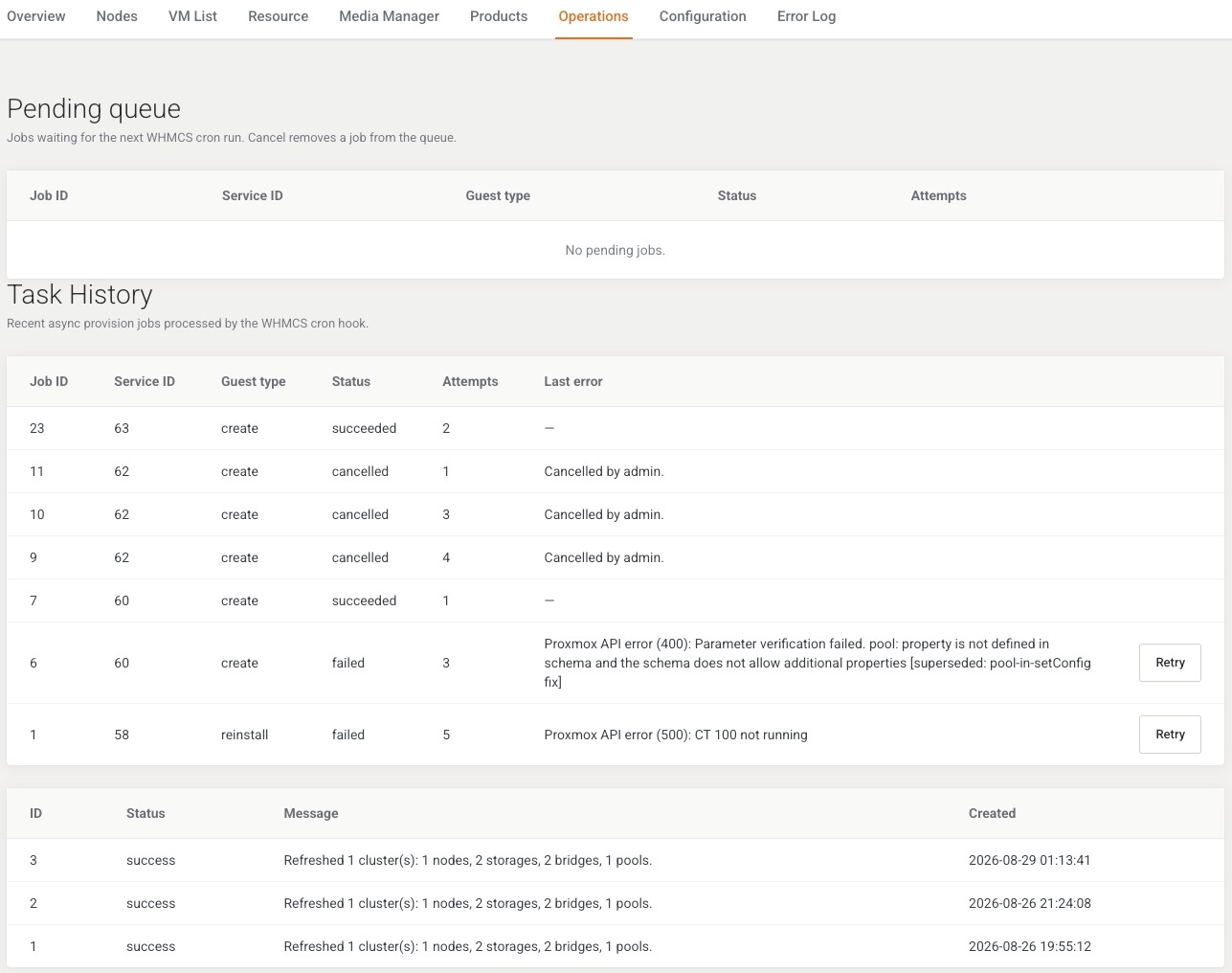
There are no filters. Three sections are shown, each capped at 50 rows.
Create enqueues a provision job and runs it once immediately. Whatever is still pending is drained by cron task Provision jobs (*/5 * * * *).
Pending queue
Jobs whose status is pending. Columns: Job ID, Service ID, Guest type (the job type value), Status, Attempts, Cancel. Empty: No pending jobs.
Cancel is offered on pending rows only. Flash: Job cancelled.
Task History
Recent jobs. Columns: Job ID, Service ID, type, status, attempts, Last error, Retry on failed rows. Empty: No records yet.
Retry queues the job again. Flash: Job queued for retry. A missing id: Job not found. Retries stop after 5 attempts.
Catalog refresh log
Columns: ID, Status, Message, Created. This is the log for Farm catalog cache, also linked from Cron Scheduler.
Example
A create that stays pending: open this page, read Last error on the failed or pending row. An empty node selection means the policy or the catalog cache could not pick a node. Fix the policy, run Farm catalog cache, then Retry.
Next step
Module warnings that are not jobs: Error Log.