
Overview
About Proxmox Suite
This page introduces Proxmox Suite: what it sells, which two WHMCS modules it needs, and where an operator starts. It is written for administrators evaluating or newly installing the suite.
What the suite does
Proxmox Suite connects Proxmox VE to WHMCS so orders create, suspend, and terminate KVM virtual machines and LXC containers without a manual step in the Proxmox UI for every ticket.
Two modules share one database:
| Piece | WHMCS path | What breaks if it is missing |
|---|---|---|
| Addon | modules/addons/SrvProxmoxSuite/ |
No clusters, policies, IP pools, packages, cron UI, or templates. Admin menu name: Proxmox Suite. |
| Server module | modules/servers/SrvProxmoxSuite/ |
Create, Suspend, Unsuspend, Terminate, and the Client Area do nothing. Product module name: Proxmox Suite. |
The addon does not use the WHMCS Servers tab. API tokens live on Nodes → Clusters List. A product only needs Module Name Proxmox Suite plus three module options: Distribution Policy, Guest Type, and Hardware Package.
Who it is for
- Owners — terminate timing, which client actions are allowed, and how often cron runs.
- Operators — clusters, templates, IP blocks, VM Plans, Task History.
- Support — import or attach an existing Proxmox guest, read IP Logs, see why a client button is hidden.
- Engineers — encoded install,
srvprox.lic, crontab, and the optional console proxy.
What you can sell in this build
| Surface | In the menu | Meaning |
|---|---|---|
| VM Plan | Yes | One WHMCS service maps to one KVM or LXC guest. |
| Cloud Plan, Cloud Conf. Option, VM Cloud List | No | Multi-VM cloud surfaces are switched off until single-guest VPS is stable. Direct cloud URLs open VM Plan. |
Admin families
Addons → Proxmox Suite opens these top tabs:
| Family | First screen | What it holds |
|---|---|---|
| Overview | Info | License and module identity. The farm dashboard is a separate page, not the tab landing. |
| Nodes | Clusters List | API connections, live node inventory, distribution policies. |
| VM List | VMs List | Live guests and the WHMCS link. VM Cleaner is under Management. |
| Resource | IPv4 Addresses | Network (IPv4, IP Logs, IPv6, IPv6 Subnets) and Templates Center. |
| Media Manager | Media library | Icons for OS cards. No sidebar. |
| Products | VM Plan | Packages, VM Conf. Option, Conf. Option Settings. |
| Operations | Task History | Provision queue, retries, catalog refresh log. |
| Configuration | General | Terminate policy, client gates, console, cron. |
| Error Log | Error Log | Local text log. No sidebar. |
Until a license key on Info is accepted, other families redirect back to Info.
How a paid order becomes a guest
- Cluster Connection — API URL and token the suite trusts.
- Farm catalog cache — cron fills node, storage, and bridge dropdowns.
- Distribution Policy — which cluster, how to pick a node, which IP pools, default storage and bridge.
- VM Plan — CPU, RAM, disk, OS media, network, and firewall for what you sell.
- WHMCS product — server module Proxmox Suite, pointed at that policy and package.
- Provision job — Create enqueues work, runs it once immediately, and cron retries what is still pending. The row is visible in Task History.
Farm snapshot
The dashboard (page=overview, also page=dashboard) is not a sidebar item. Overview in the tab bar opens Info. Open the snapshot from a KPI link or the direct page parameter.
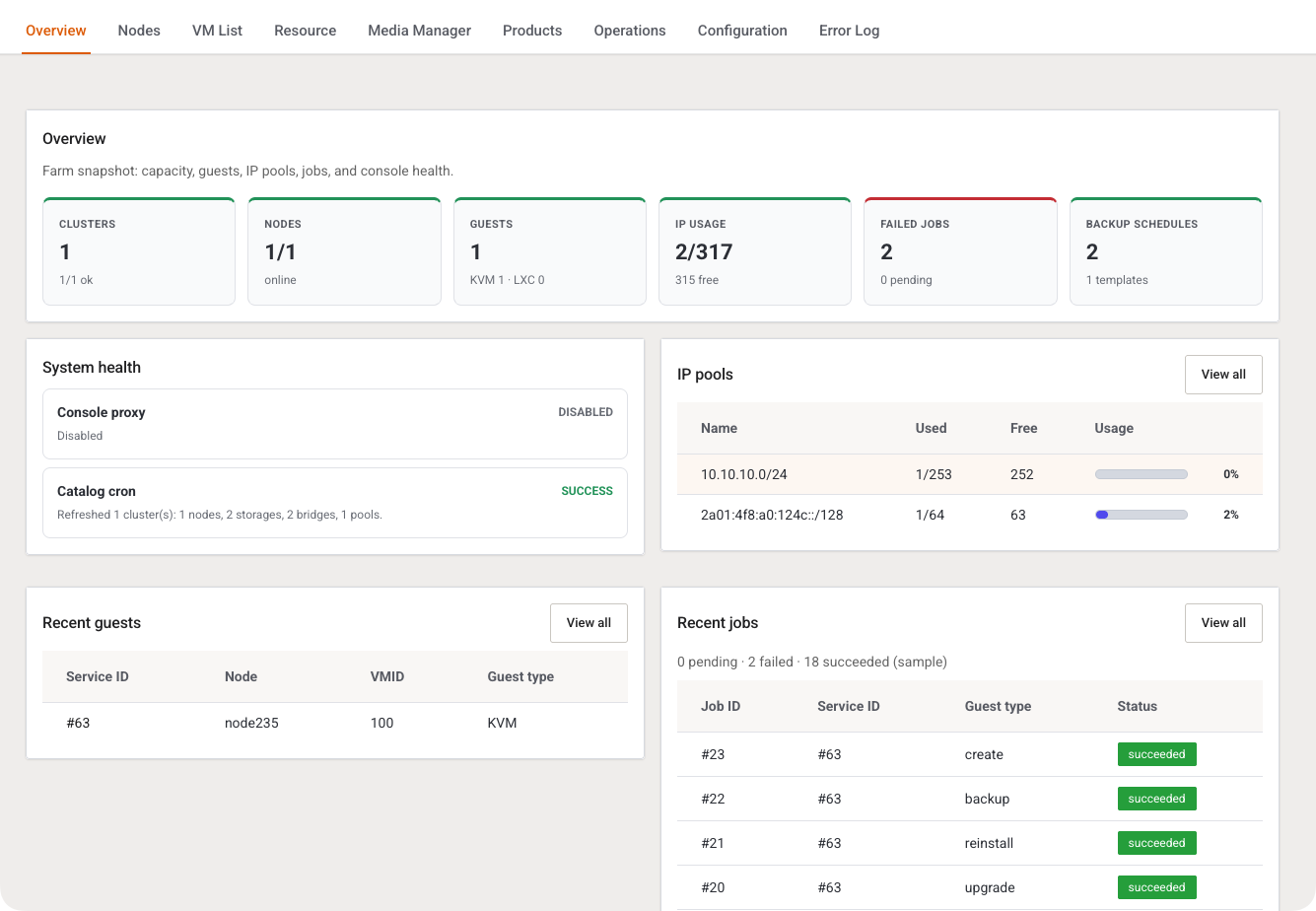
Clusters, nodes, linked guests, IP usage, failed jobs, and backup schedules. Each card links to the screen that owns that number.
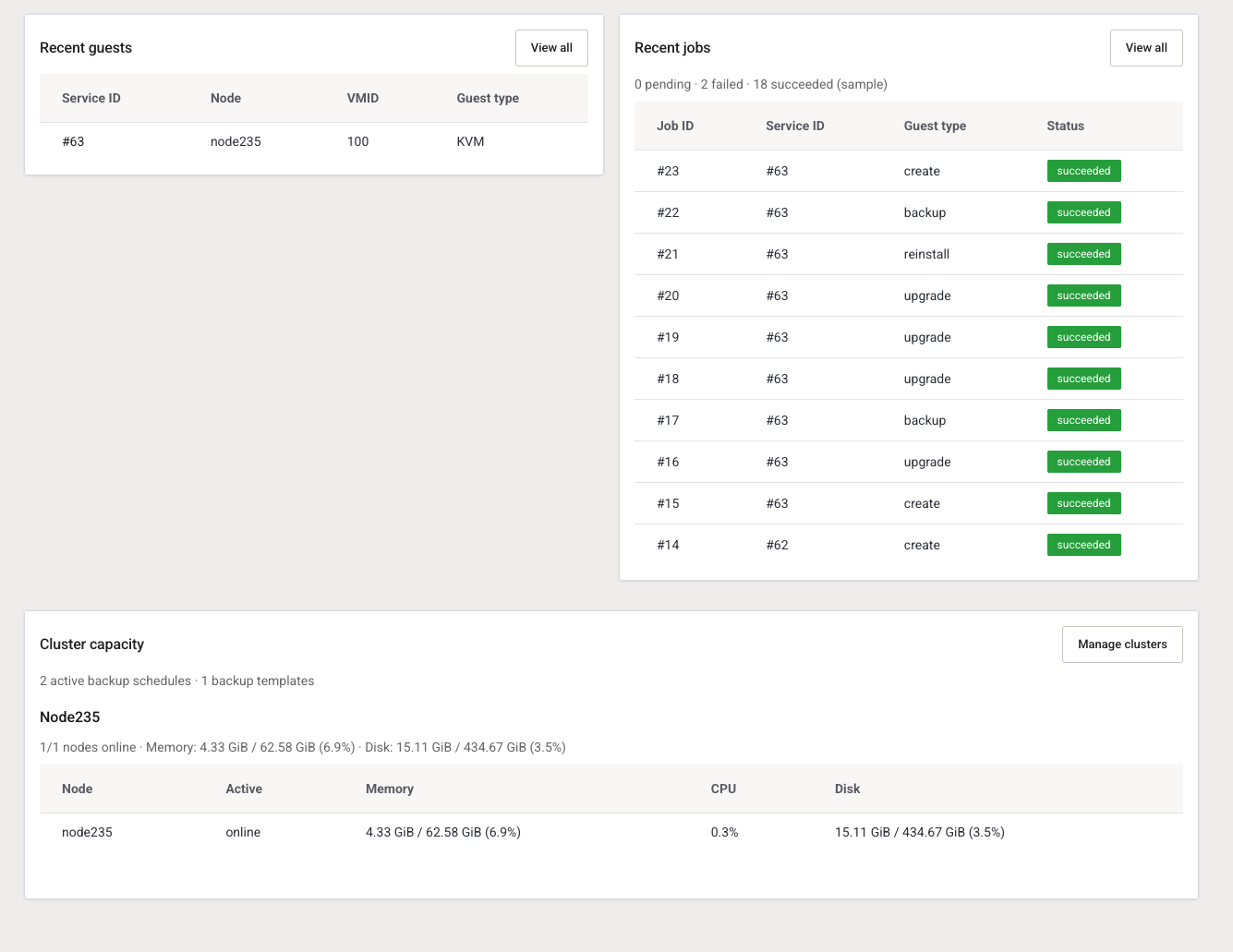
IP pool usage, recent linked guests, recent jobs, and live cluster capacity. Empty pools here are why the next paid order fails at provision time.
| Card | What the number is | Opens |
|---|---|---|
| Clusters | Cluster rows, and how many health checks are ok | Clusters List |
| Nodes | Online nodes over total | Nodes List |
| Guests | Linked guests, split KVM and LXC | VMs List |
| IP usage | Assigned or reserved addresses over total | IPv4 Addresses |
| Failed jobs | Failed count, with pending in the subtitle | Task History |
| Backup schedules | Active schedules, with template count | Scheduled Backup Templates |
System health shows whether the optional console proxy is ready, and the last Farm catalog cache run. Cluster capacity lists memory, CPU, and disk for each active cluster.
Requirements
| Requirement | Minimum | Notes |
|---|---|---|
| WHMCS | 8.13+ | Admin theme that loads the suite assets |
| PHP | 8.2+ | Match the encoded build |
| ionCube Loader | 13+ | Encoded production trees |
| Proxmox VE | API token | Token must manage guests on the nodes you sell |
Next step
Continue to Info and license, then Install Proxmox Suite.