
Guide
VM Conf. Option and Conf. Option Settings
This page covers the two order-option screens under VM Plan. It is written for the operator who lets customers pick an OS, extra IPs, or a disk size at order time.
VM Conf. Option
Menu: Addons → Proxmox Suite → Products → VM Plan → VM Conf. Option
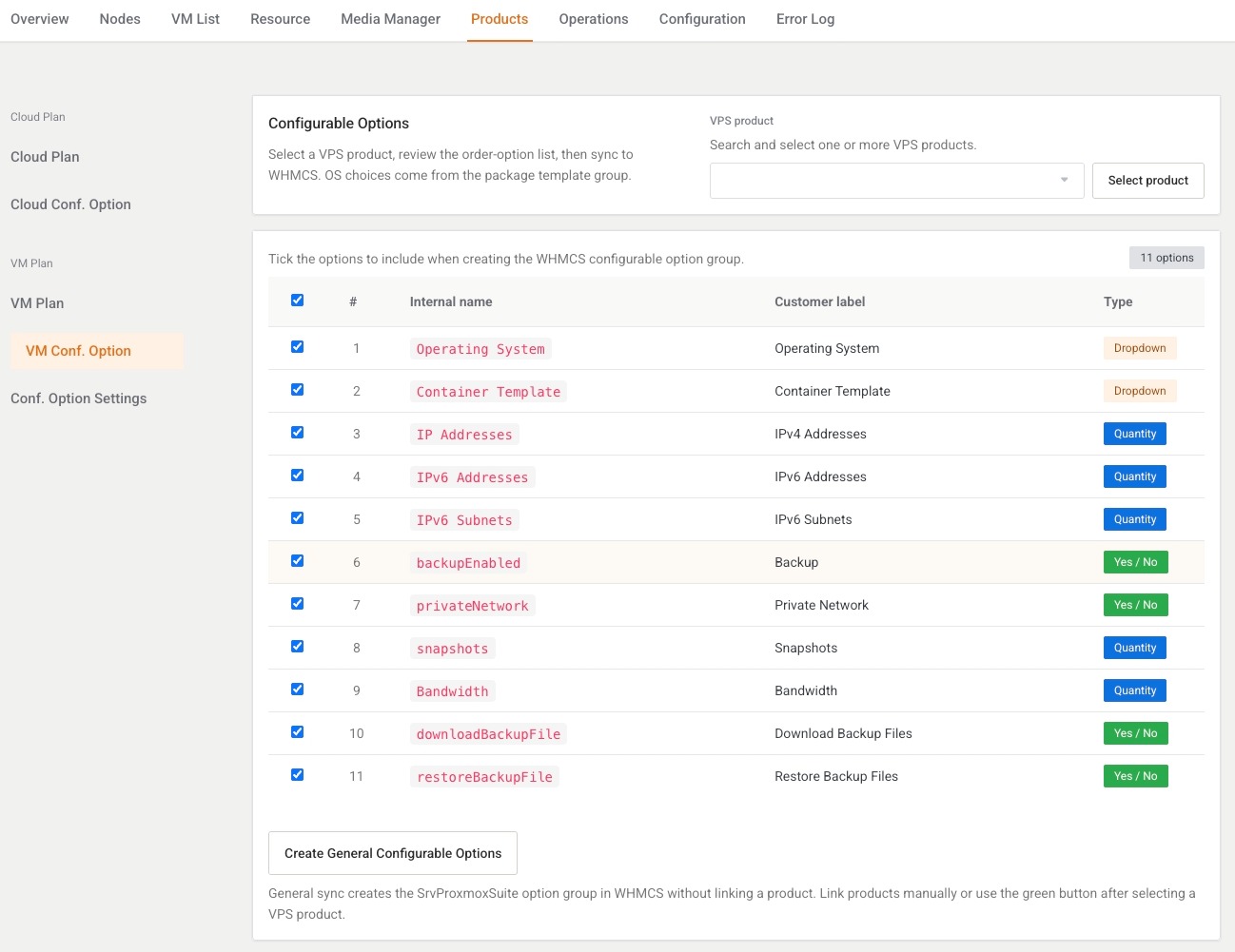
Purpose
Hint: Select a VPS product, review the order-option list, then sync to WHMCS. OS choices come from the package template group.
The product filter lists VPS products only. Pick one or more, then Select product.
Option catalog
Columns: checkbox (all on by default), number, Internal name, Customer label, Type.
| Key | Internal name | Customer label | Type |
|---|---|---|---|
operating_system |
Operating System | Operating System | Dropdown |
os_template |
Container Template | Container Template | Dropdown |
extra_ips |
IP Addresses | IPv4 Addresses | Quantity |
ipv6_addresses |
IPv6 Addresses | IPv6 Addresses | Quantity |
ipv6_subnets |
IPv6 Subnets | IPv6 Subnets | Quantity |
backup |
backupEnabled | Backup | Yes / No |
private_network |
privateNetwork | Private Network | Yes / No |
snapshots |
snapshots | Snapshots | Quantity |
bandwidth_gb |
Bandwidth | Bandwidth | Quantity |
download_backup |
downloadBackupFile | Download Backup Files | Yes / No |
restore_backup |
restoreBackupFile | Restore Backup Files | Yes / No |
OS dropdown choices come from the package template group. At least one option must stay ticked.
Actions
| Button | What it does |
|---|---|
| Create General Configurable Options | Opens a modal. Group name defaults to SrvProxmoxSuite, maximum 100 characters, required. Creates the shared group. |
| Create Configurable Options | Syncs the ticked options onto the selected products. |
| Configurable Option Settings | Shown when exactly one product is selected. Several products: Open Conf. Option Settings for one product at a time. |
Conf. Option Settings
Menu: Addons → Proxmox Suite → Products → VM Plan → Conf. Option Settings
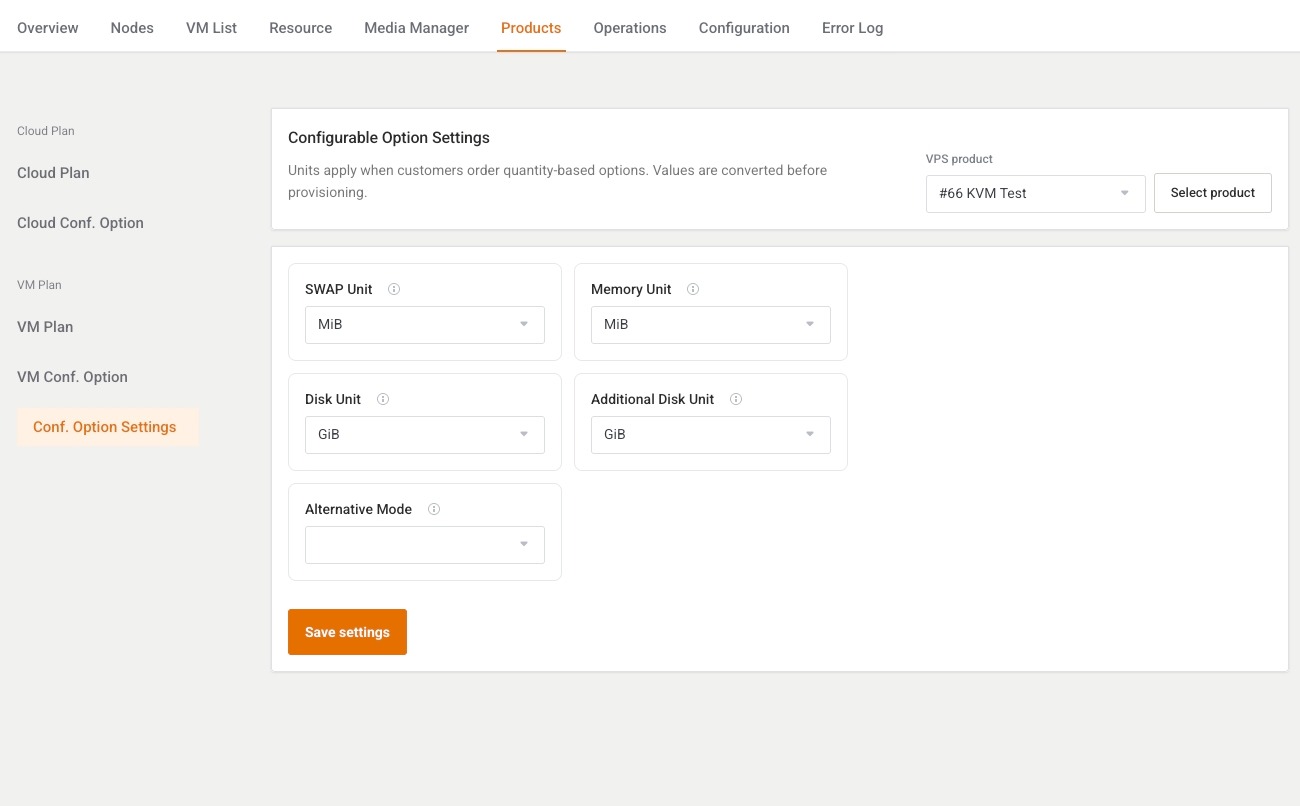
Purpose
Units apply when customers order quantity-based options. Values are converted before provisioning.
No product: Select a VPS product to create or update configurable options.
Save posts the units. Flash: Configurable option settings saved.
| Field | Choices | Used at provision |
|---|---|---|
| SWAP Unit | MiB or GiB | Yes, converted to MiB. |
| Memory Unit | MiB or GiB | Yes, converted to MB. |
| Disk Unit | MiB or GiB | Yes. |
| Additional Disk Unit | MiB or GiB | Yes. |
| Alternative Mode | Empty, Default (replace when ordered), Replace package defaults, Add to package defaults | Saved on the product. Provision does not read it yet. |
Note
Set the unit fields before the first order that sells extra memory or disk. Alternative Mode will not add to or replace package defaults until provisioning uses that column.
Example
- Select the KVM VPS product.
- Leave Operating System, IPv4 Addresses, and Bandwidth ticked.
- Create Configurable Options.
- Open Conf. Option Settings and set Disk Unit to GiB if the order form sells disk in gigabytes.
Next step
Icons for OS cards: Media Manager.