
Guide
IPv4 Addresses
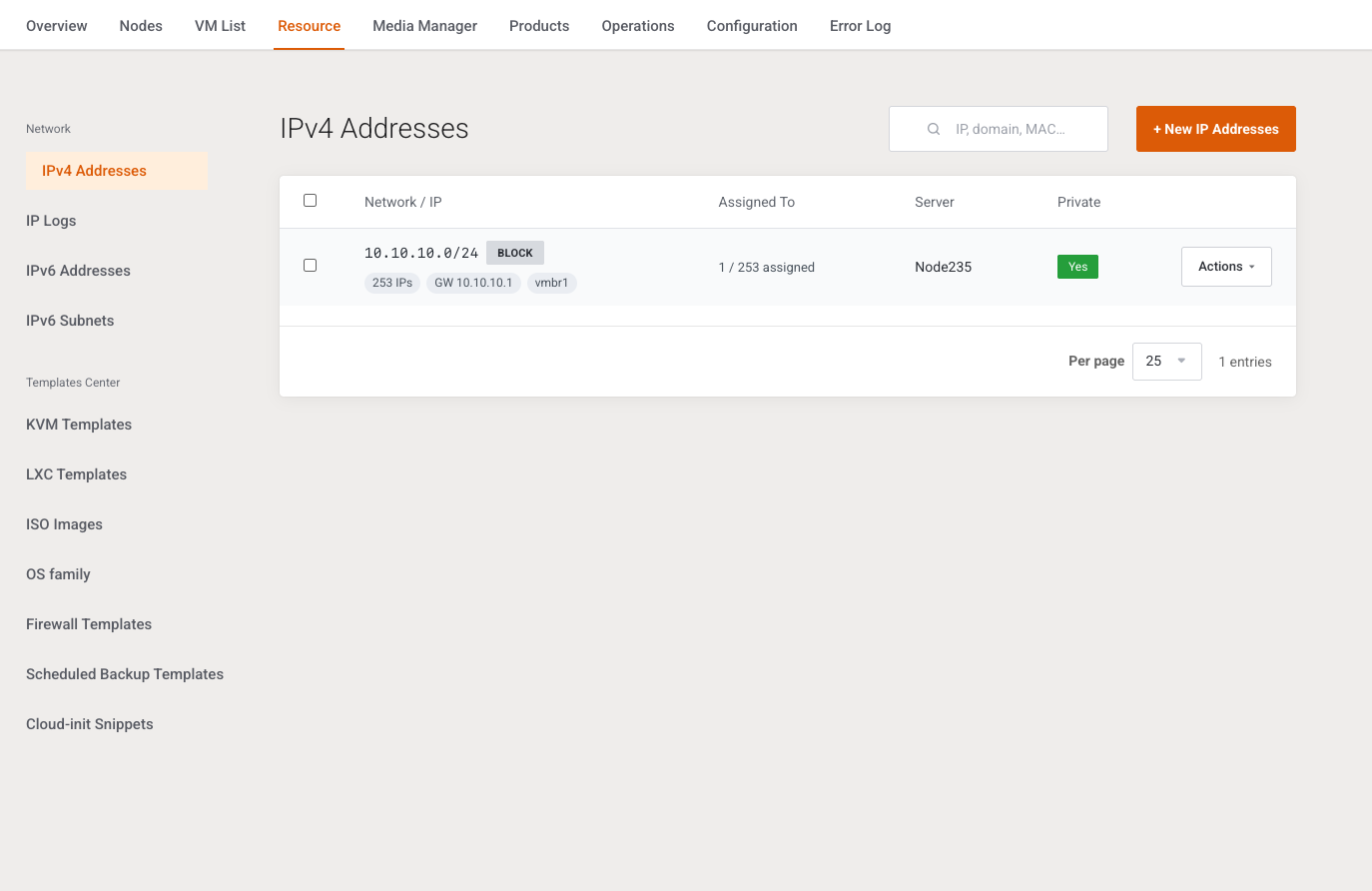
This page creates and assigns IPv4 pools. It is written for the operator who owns the public ranges sold on VPS plans.
Menu: Addons → Proxmox Suite → Resource → Network → IPv4 Addresses
Purpose
Each pool is one block (many addresses) or one address. Assignment here is inventory: it records which WHMCS service holds the address. It does not push a NIC change to Proxmox by itself.
The same form is used for IPv6 Addresses and IPv6 Subnets. IP type is locked to IPv4 on this page.
List
| Control | What it does |
|---|---|
| Search | Placeholder IP, domain, MAC…. Matches address, label, MAC, gateway, bridge, node, and assigned names. |
| + New IP Addresses | Opens the create modal. |
| Per page | 10, 25, 50, 100, or all. Default 25. |
Columns: selection, Network / IP, Assigned To, Server (cluster name), Private (Yes / No).
A block row shows the CIDR or range, a Block badge, address count, gateway, and bridge, plus {assigned} / {total} assigned. A single row shows the address and, when assigned, a link to the service.
| Action | What it does |
|---|---|
| View IPs | Lists addresses in a block: IP address, Assigned To, MAC, Actions. |
| Edit | Metadata only. The address list is not rebuilt. |
| Delete on a block | Confirms Delete this entire IP block? |
| Assign | Service id, minimum 1. Confirms Assign this IP to the given WHMCS service? Flash: IP address %s assigned to service. |
| Release | Confirms Release this IP from its service? Flash: IP address released back to the pool. Writes an IP log. |
| Delete on one address | Confirms Delete this record? |
| Delete selected | Confirms Delete selected IP addresses? Flash: %d IP address(es) deleted. |
Create
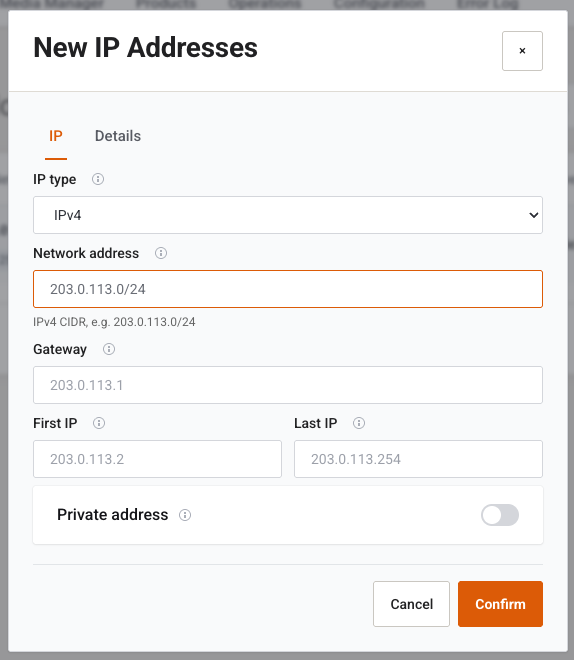
Tabs IP and Details. Cancel closes. Confirm creates the pool. Success: %d IP address(es) created. Nothing generated: No IP addresses were generated.
| Field | Type | What it does |
|---|---|---|
| IP type | Select, disabled | IPv4 on this page. |
| Network address | Text | CIDR, for example 203.0.113.0/24. Required if first and last are empty. |
| Gateway | Text | Gateway pushed to guests. On a CIDR create, an empty gateway is filled with the first usable host. |
| First IP / Last IP | Text | Inclusive range. Used for IPv4. A range may generate up to 4096 addresses. A CIDR may generate up to 1024 usable hosts. /31 and /32 are not stripped of network and broadcast. |
| Private address | Switch | Marks the pool as not routed on the public internet. |
Provide a CIDR or a first and last address. Otherwise: Provide network CIDR or first/last IPv4 addresses. Prefix must be 0–32.
| Field | Type | What it does |
|---|---|---|
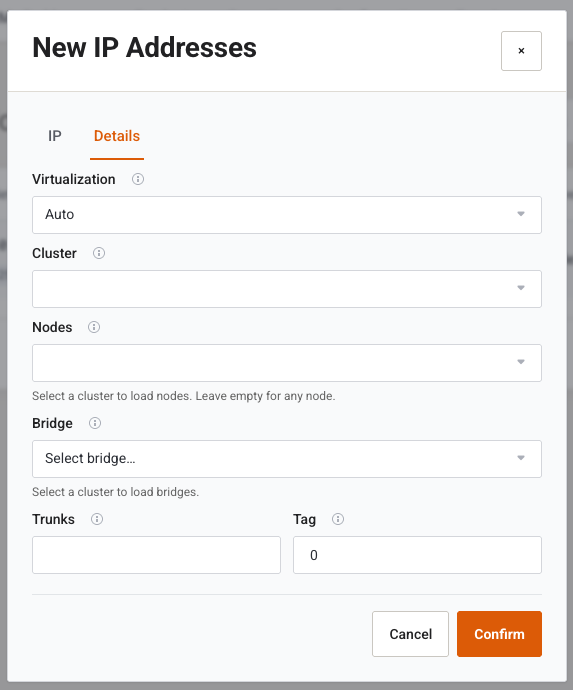
| Virtualization | Select | Auto, KVM, or LXC. Unknown values are stored as Auto. |
| Cluster | Multi-select | Empty means any cluster. The first selected cluster is the primary. Choosing a cluster loads bridges and nodes. |
| Nodes | Multi-select | Empty means any node inside the selected clusters. |
| Bridge | Select | Proxmox bridge, for example vmbr0. Placeholder Select bridge…. |
| Trunks | Text | Comma-separated VLAN trunk ids. |
| Tag | Number, 0–4094 | Access VLAN. 0 is stored as empty. |
Edit
Title Edit IP Block. Type, network, and first/last are hidden. You can change gateway, private flag, virtualization, clusters, nodes, bridge, trunks, and tag. Success: IP block updated. Missing pool: IP block not found.
Assign rejects a missing service id (WHMCS service id is required.), a missing service (WHMCS service not found.), and an address that is already allocated.
Example
- + New IP Addresses. Network
203.0.113.0/29. Gateway203.0.113.1. - Details: cluster, bridge
vmbr0, virtualization KVM. - Confirm. Attach the new pool on Policy Manager.
Next step
IPv6 Addresses and IPv6 Subnets if the plan sells them. Assignment history is on IP Logs.